




I like to watch deployments that incorporate my code like a hawk.
Not because I'm anxious — because I've been burned enough times to know that the gap between "merged" and "confirmed green" is where things go sideways. A regression surfaces, nobody catches it in time, and suddenly the next morning is spent fixing code or tests that were knowable the night before.
For a long time, watching a deployment meant leaving my terminal and opening a different application, finding the right deployment, and investigating failures manually. This is out of my flow, so it adds cognitive load and friction in keeping my pipeline fast and green.
We just shipped something that changes that. The mabl MCP (Model Context Protocol) server is an implementation of the Model Context Protocol — an open standard that lets AI coding agents call external tools — and it gives agents like Claude Code, Cursor, and VS Code with Copilot direct access to your mabl test workspace.
What's new in the mabl MCP server
If you're already using mabl's MCP server in your coding agent, the update that shipped this week is worth understanding. Not just for the individual capabilities, but for how they're designed to work together.
The bigger thing here is progressive disclosure. The MCP server now gives your agent access to the full power of mabl's agentic failure analysis and test recovery, but the way we've built it is that we're really thoughtful about the instructions we give the agents on how to use these tools. The agent doesn't dump everything on you at once. It surfaces what you need, when you need it, and escalates to deeper analysis only when the signal warrants it.
Here's what's specifically new:
-
Natural language deployment lookup: You used to need a commit hash or deployment ID to query a specific run. In a Claude Code or Cursor session, you wouldn't have that handy. Now you can just say: "Check the deployment I just pushed to prod." The agent finds it.
-
Real-time polling: Your agent can now watch a deployment as it runs, polling mabl regularly and providing live updates, without you prompting it again. You ask once and it watches. You can move on to your next task. You'll see the update when the agent needs your input.
-
Artifact retrieval: You can pull specific test artifacts (DOM snapshots, HAR files) directly from your agent session when you need to dig into a failure.
-
Agentic failure analysis and test recovery: When a test fails, the agent can invoke mabl's full failure analysis and root-cause pipeline. Not a single LLM call, but a multi-step agent workflow that cross-references live failures against your test suite's historical data. It can also surface recovery paths for tests that are flaky or newly broken.
That last part is the thing that makes this more than a convenience feature. Here's what it looks like in practice.
Walking through a real deployment
This is what happened when I was working on a new feature last week. After merging and tagging a set of changes for deployment, I asked Claude to keep an eye on the test results.
Step 1: One prompt, full deployment picture
I didn't pass a deployment ID. I just asked: "Using mabl MCP, check test results for the most recent deployment to the mabl prod tests workspace."
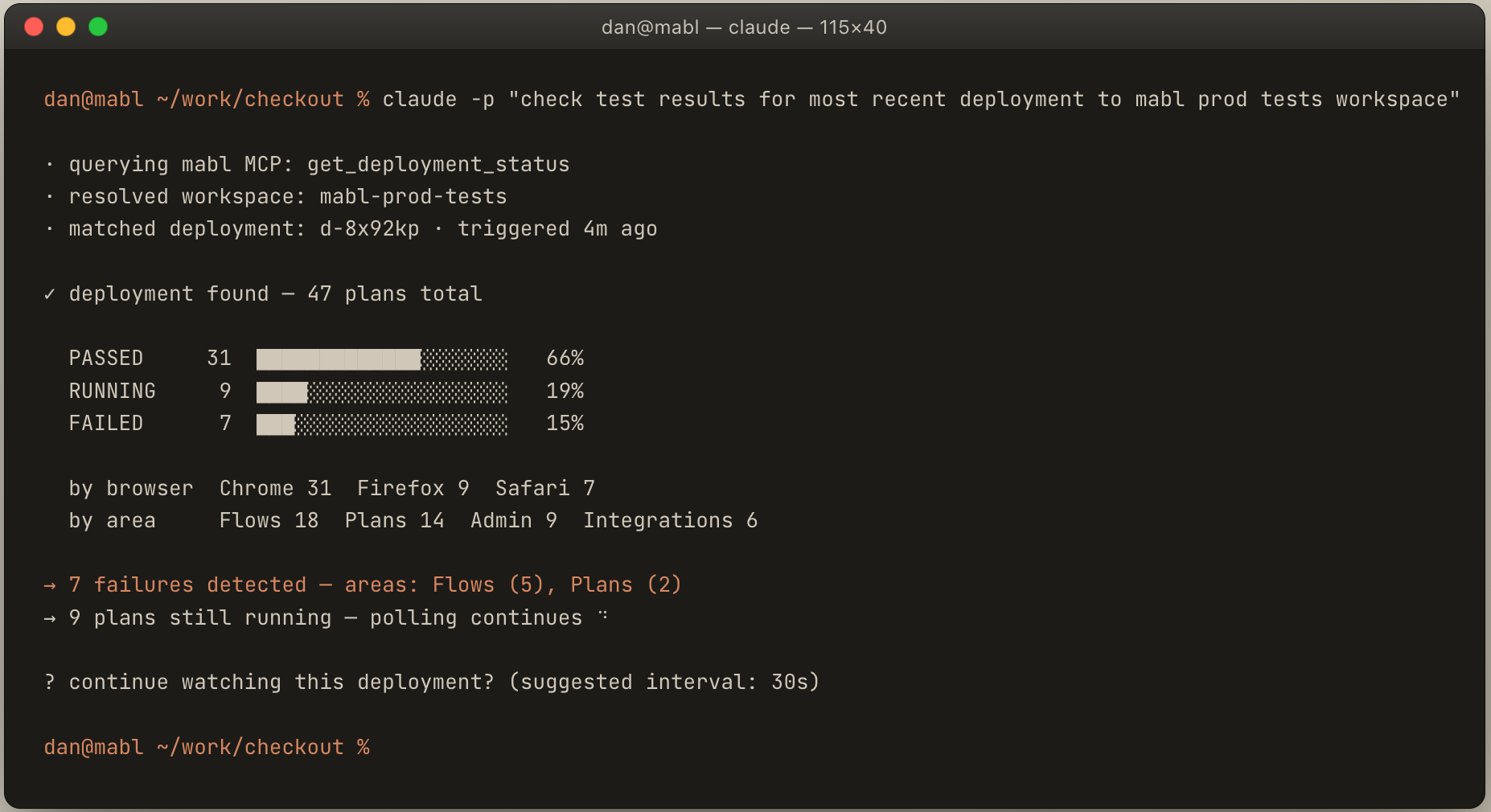 Claude found the right tools on its own. No workspace ID, no commit hash. It came back with a complete summary: pass/fail breakdown, coverage by browser and feature area, and an offer to keep watching. I said yes.
Step 2: Failures accumulate, and Claude starts reading them in real time
From there, Claude polled on its own every ~30 seconds. When failures started surfacing, it didn't just log them. It started reading the patterns.
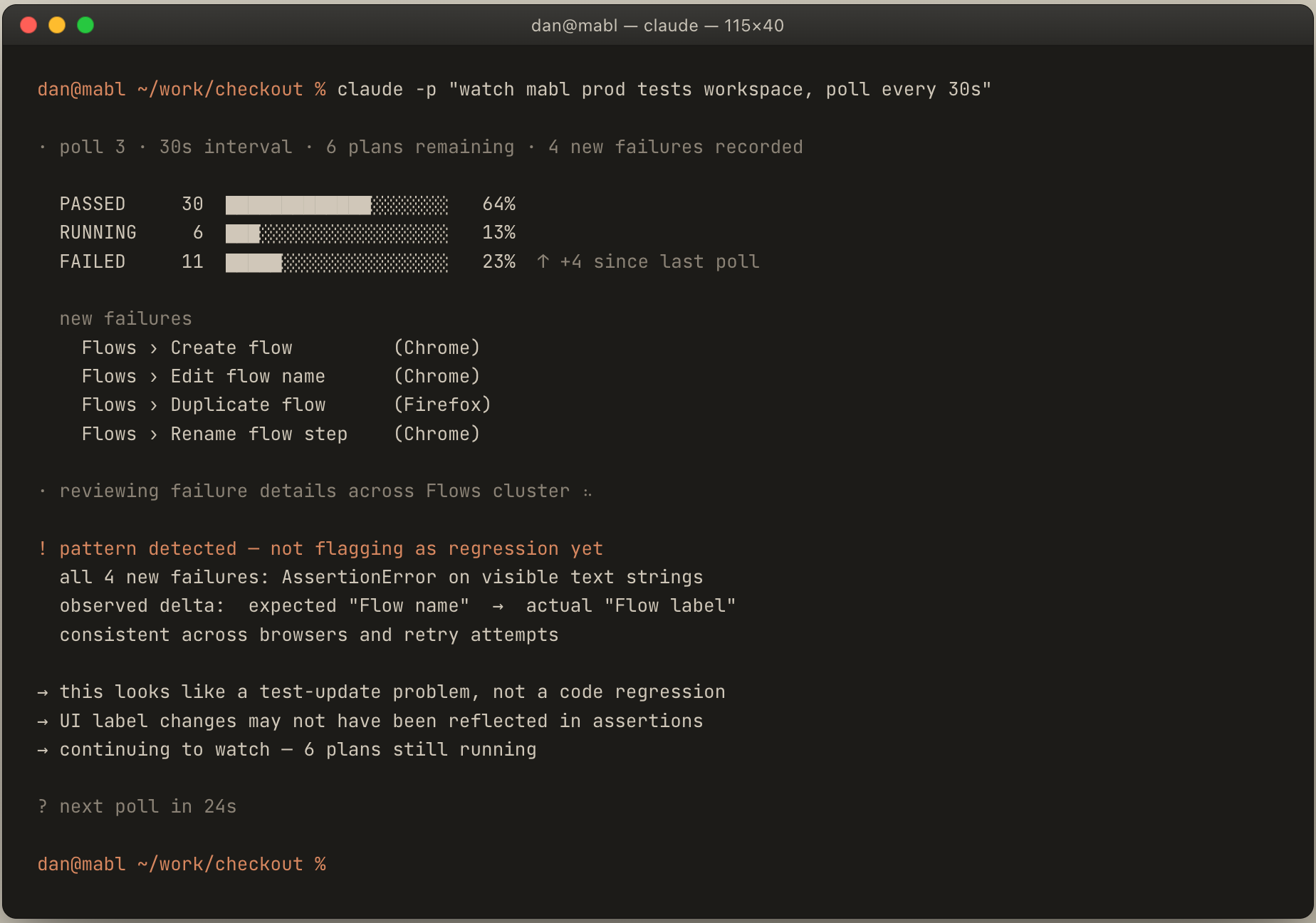 That observation, made while the deployment was still running, is worth pausing on. Claude wasn't asked to analyze anything yet. It recognized that every new failure in the Flows cluster involved the same UI text delta, and flagged it as a test-update problem before I'd asked a single follow-up question.
Step 3: Triage recommendation, not just a failure list
Once it had enough signal, Claude stopped waiting for the full terminal state and gave me a summary.
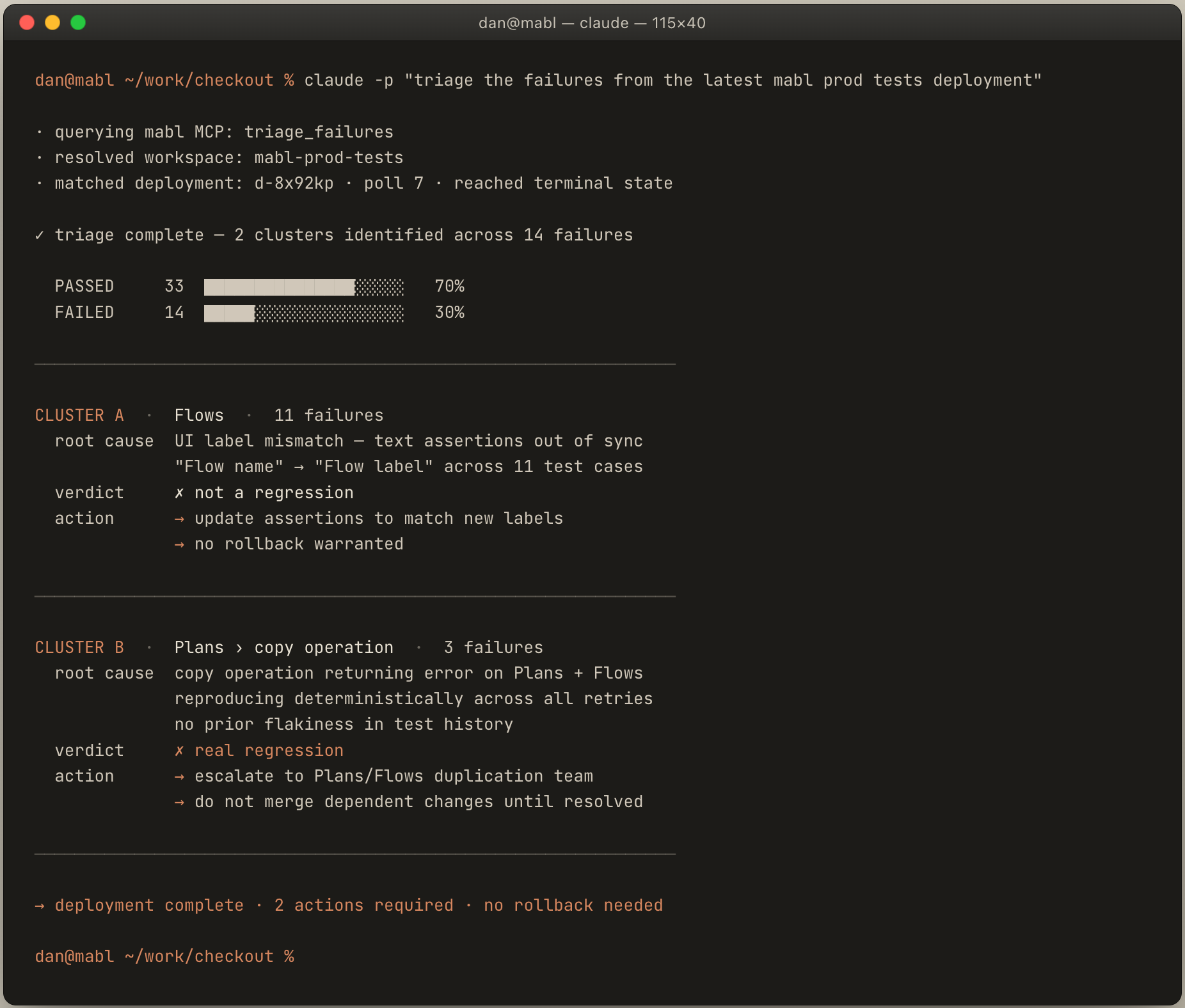 Two clusters, two different recommended actions. The Flows failures: tests need updating to match new UI labels, not a code rollback. The copy operation failures: reproducing deterministically across retries, which means something actually broke. Escalate to the team that owns Plans and Flows duplication.
That distinction, "update the tests" versus "this is a real regression, escalate it," is the thing that matters. A bare language model can't make that call reliably, because it requires knowing what your test suite has looked like over time. mabl has that history.
I never opened the mabl app.
AI coding agent + mabl vs. AI coding agent + Playwright: why it matters for test failure analysis
The obvious question: can't I just point Claude at a Playwright suite and get something similar?
For pass/fail, yes. But agentic test triage – the kind that distinguishes a flaky test from a real regression – isn’t something a bare LLM can produce reliably. It requires knowing what your test suite has looked like over time: which tests are historically flaky, whether this failure pattern has appeared before, whether the error is consistent across retries.
mabl has been accumulating that data since your tests first ran. When the analysis distinguishes between a UI refactor that broke string assertions and a copy operation that's genuinely failing, that's not pattern matching on an error message. It's cross-referencing against your test suite's actual history.
The tooling matters too. The MCP server isn't wrapping a stack trace in a prompt and asking Claude to interpret it. It's exposing a purpose-built set of tools: deployment status, plan-run breakdown, failure analysis with retry context, artifact retrieval. You're not asking your agent to improvise, you're giving it an actual testing toolkit.
This works with whatever you're already using
The mabl MCP server is built on the Model Context Protocol standard. That means it works with any MCP-compatible client: Claude Code, Cursor, VS Code with GitHub Copilot, or any AI coding agent runtime that supports MCP tool calls.
You configure it once. From there, the workflow described above is available in whichever environment you actually work in.
If you're already using mabl
The get_deployment_status tool is available in the mabl MCP server now. The simplest way to try it: after your next deployment, ask your coding agent: "Check the status of my most recent deployment to [your workspace name]." Watch what happens from there.
For full documentation on the mabl MCP server and available tools, visit mabl.com/mabl-mcp-server.
If you're not using mabl yet
The deployment monitoring workflow described here is one part of what the mabl MCP server enables. The broader picture: your coding agent can query your test workspace, trigger runs, pull failure analysis, and in many cases get to the root cause, all without switching contexts. This makes mabl one of the few AI-native test automation platforms with a production-ready MCP server for software development teams.
If that's interesting to you, the best next step is to see it working against your own stack. Request a demo or start a trial.

.png?width=400&height=200&name=Untitled%20(32).png)